Isolated Browser Sessions for Multi-Account Console Access

The atmos auth console command now supports isolated browser sessions, allowing you to have multiple cloud provider consoles open simultaneously — one per identity — without logout conflicts.
What Changed
When you run atmos auth console for different identities, each session now opens in its own isolated Chrome browser context. No more logout conflicts when switching between accounts — whether you're using AWS, Azure, or any other supported provider.
Enable it globally in your atmos.yaml:
auth:
  console:
    isolated: true
Or per-invocation with the --isolated flag:
atmos auth console --identity plat-staging/AdministratorAccess --isolated
atmos auth console --identity cards-staging/AdministratorAccess --isolated
Both sessions run simultaneously in separate browser windows with fully isolated cookies and session state.
Why This Matters
Teams working across multiple cloud accounts frequently need to have several consoles open at once — comparing configurations, debugging cross-account issues, or monitoring deployments across environments. Cloud providers like AWS and Azure enforce a single session per browser context, forcing users to log out and back in every time they switch accounts.
If you've ever seen this, you know the pain:
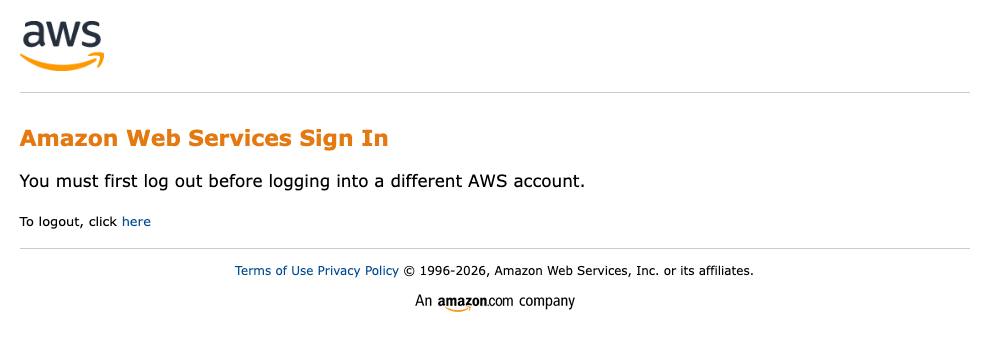
Isolated sessions solve this by giving each identity its own Chrome browser profile via --user-data-dir. This works for any provider that atmos auth console supports — AWS, Azure, and others as they're added. Sessions are deterministic per identity, so reopening the same identity reuses its profile (no re-login needed within the session lifetime). Different identities are fully isolated.
Platform Support
Isolated sessions work on any platform with Chrome or Chromium installed:
- macOS: Uses
open -na "Google Chrome" --args --user-data-dir=<dir> - Linux: Uses
google-chrome --user-data-dir=<dir> - Windows: Uses
chrome.exe --user-data-dir=<dir>
If Chrome is not installed, Atmos falls back to the default browser with a helpful warning. The feature degrades gracefully — it never blocks console access.
Get Involved
Have questions or feedback? Join us on Slack or open an issue on GitHub.